Bring your own key is live on the web
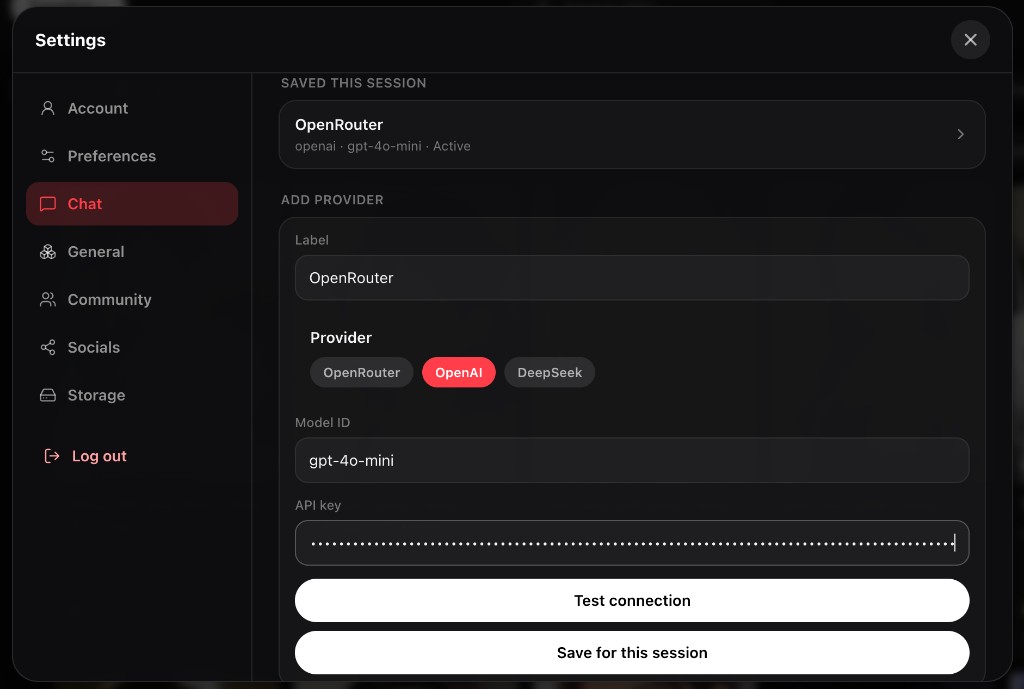
Want a specific model, or to run chat on your own provider bill? You can now plug in your own API key on vibeside web. Pick OpenRouter, OpenAI, or DeepSeek, save it for the session, and chat with that setup.
How it works
Open Settings, go to Chat, then Bring your own key. Turn it on, add a provider, set a model id, paste your key, and hit Test connection if you want a quick check. Save for this session. While it’s active, that provider overrides the platform model for normal (sync) chat replies.
Those BYOK turns don’t pull from your vibeside AI budget. You’re paying the provider directly for the calls.
What we don’t keep
We don’t store your key on our servers. On the web it lives in session memory for that browser tab session. It only goes out when you test the connection or send a chat message that needs it. Close the session and it’s gone.
Limits (on purpose)
V1 is allowlisted presets only: OpenRouter, OpenAI, and DeepSeek. No custom proxy URLs. BYOK is for sync chat, not live chat. That’s the trade for keeping the surface small and the key handling boring in a good way.
Try it today from settings on the web.